Human-in-control AI: how to use AI without losing oversight

TL;DR
Human-in-control AI is a way of using AI in IT service management that starts with augmenting your team and, over time, extends to letting AI agents handle tasks on your team's behalf. The constant throughout is human oversight: your team approves what AI does before it acts, then monitors and adjusts as confidence grows.
At the augmentation end, AI drafts and suggests. Response drafts, category recommendations, predicted priorities. Your team reviews them before anything reaches a user.
As you go further, AI agents take on more. They act rather than just assist. Human-in-control means you approve those actions at first, then shift to monitoring what agents do once trust is established. Your ITSM tool stays the foundation throughout: that's where tickets are logged, routed, and resolved, and where accountability sits.
This is the most practical way to get value from AI without the risks of moving too fast. You extend AI's role step by step, with a hand on the controls the whole time. It's the boring version of AI. It's also the one that actually works in production.
Done well, AI clears your team's desk. Done badly, it just hands you a different mess.
The main benefit of human-in-control AI
- Your team gets the speed of AI with the judgement of a person—and your users get a service they can trust.
The primary risk it addresses of human-in-control AI
- AI without oversight produces wrong answers, frustrated users, and decisions no one can explain.
The key action of human-in-control AI
- Decide where AI gets to act on its own, where it needs review, and where it shouldn't be involved at all. Make those rules explicit.
Who human-in-control AI is for
- Service leaders deciding how much autonomy to give AI in their tools.
- Teams using AI now and worried about over-relying on it.
- Teams not currently using AI, and worried about over-relying on it.
When human-in-control AI matters
- When you're rolling out AI features for the first time.
- When something has already gone wrong because AI was given too much autonomy.
- When your team is considering implementing AI in your IT service desk but don’t want to give up too much control.
Key takeaway
- The most reliable AI setups in service management are the ones where humans stay in control of decisions, even as AI does more of the legwork.
What "human-in-control" actually means
Human-in-control AI is straightforward as an idea: AI does the heavy lifting, and people stay in charge of the decisions that matter. It's sometimes called "human-in-the-loop," though that phrasing can mean different things in different contexts.
In service management, the principle plays out across a few areas:
AI suggests, people decide: Suggested responses, recommended categories, predicted priorities: all of it is presented to an agent who can accept, edit, or reject it. The AI moves quickly. The agent keeps control of what goes out.
AI handles patterns, people handle exceptions: Repetitive, predictable work gets automated. Anything ambiguous, sensitive, or unusual escalates to a person.
AI is transparent: Your team can see what the AI is doing and why. When the AI gets something wrong, that's traceable.
Users can always reach a person: No customer ever gets stuck in a chatbot loop because the system won't let them out. Escalation to a human is always one click or one message away.
Why this matters more in IT service management than elsewhere
A wrong answer in a search engine is annoying. A wrong answer in a creative tool is fixable in five minutes. A wrong answer from an IT service team can lock users out, miss SLAs, create security risks, and chip away at trust until it's gone.
The work IT service teams do involves people. People who are frustrated, confused, in a hurry, or dealing with something sensitive. That's exactly the kind of context AI struggles with on its own. Keeping a person in the decision loop is what makes AI safe to use in this environment. There's a legal dimension to this too. When an AI agent does something that violates a regulation or breaches a legal obligation, the liability sits with your company and the people running it. AI doesn't bear legal responsibility, your team does.
There's also an organizational reason. When something goes wrong, someone needs to be able to explain what happened. "The AI did it" isn't an answer your CIO, your auditors, or your users will accept. Human-in-control AI keeps the chain of accountability clear.
What human-in-control AI looks like in practice
1. Suggested responses for review
Instead of AI sending a reply directly to a user, it drafts one. Your agent reviews the draft, edits it if needed, and sends it. The agent stays accountable. The user gets a response that's been seen by a person.
This is the most common form of human-in-control AI in service desks today, and the simplest place to start.
2. AI-assisted classification, with override
AI suggests where a ticket should go and what priority it should be. Operators can accept the suggestion or change it. Over time, the corrections improve the model. The decision still rests with the person.
3. Knowledge suggestions
AI surfaces relevant articles to agents and users as a starting point. The human picks what to use.
4. Chatbots with clean hand-off
For predictable requests, chatbots handle the conversation. For anything outside their scope, or whenever the user asks, they hand over to an agent with the full context. No dead ends.
5. Reporting that flags issues for review
AI summarizes ticket data and flags possible problems, like a spike in tickets that might be a major incident. Service managers decide what to do with the information.
6. Audit trails for everything
Anywhere AI is involved, there's a clear record: what it suggested, what was accepted, what was changed. That record is the basis for trust, oversight, and improvement over time.
How to put human-in-control AI into practice
None of this needs to be complicated. The trick is being deliberate about what AI can do alone, and what should always go through a person. Good ITSM tools should allow you to set up AI to support your processes, keeping your team in control.
- Map where AI is being used: Look at every place AI is involved in your workflow. For each one, ask: who makes the final decision, the AI or a person?
- Decide what AI is allowed to do alone: Some things are safe to automate fully, like auto-tagging an internal note or surfacing a knowledge article. Others aren't. Make those rules explicit.
- Build review into the workflow: For anything user-facing, an agent should be reviewing the AI output before it goes out, at least until the system is well-established.
- Make escalation easy: Users need a clear, simple way to reach a person. "Speak to an agent" should never be hidden.
- Watch what's being changed: When agents repeatedly edit or reject AI suggestions, that's a signal the model needs adjusting. Treat the corrections as useful feedback.
- Tell people what's happening: Both your team and your users should know when AI is involved. Hiding it erodes trust faster than the AI itself ever could.
Common pitfalls
- Treating "human-in-the-loop" as a checkbox: If the human is rubber-stamping AI output without reading it, oversight isn't really happening.
- Making review feel like extra work: If the workflow makes reviewing slower than writing from scratch, agents will skip it. Design review to be quick.
- Letting chatbots become dead ends: No matter how good a chatbot is, there are conversations it shouldn't be having. Build in clean exits.
- Ignoring agent feedback: Agents see when AI gets it wrong long before reporting catches it. If they're not heard, the system gets less reliable over time.
- Reducing oversight too quickly: It's tempting to dial back human review once AI is "working." Resist that temptation until you've got real data showing it's safe to do so.
TOPdesk's approach to human-in-control AI
TOPdesk's view on AI is straightforward: it should help your team work better without replacing them, and without putting your users at risk.
In practice, that means:
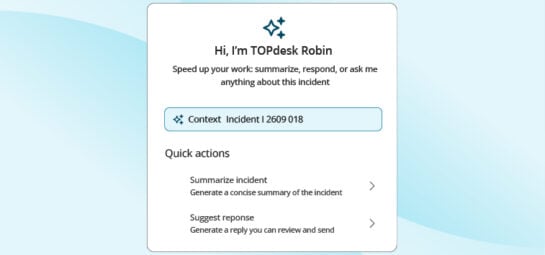
- AI features in TOPdesk are designed to assist agents, with the agent always in control of what reaches the user.
- Self-service AI hands over to a human cleanly when needed, with full context, so users don't get stuck.
- AI features can be turned on, configured, and turned off by your team. You decide where AI fits, not the other way round.
- Data handling follows GDPR. Data residency is European by default. Your customer data isn't used to train AI models, it's processed within the same secure infrastructure as the rest of TOPdesk, and your team can see what the AI is doing and where data goes.
The goal is a setup where your service team is faster and less buried in repetitive work, while your team remains in charge of the decisions that matter. For more on how this works in TOPdesk, see AI-assisted service management.
Common questions about human-in-control AI
Isn't this just "AI with extra steps"?
It's AI with the right steps. Without oversight, AI can produce confident-sounding wrong answers. Human-in-control AI keeps the speed of AI and adds the judgement of a person.
Doesn't this slow things down?
Less than you might think. Agents review responses rather than write them from scratch, so the time saved on the heavy lifting is bigger than the time spent on review.
When is it OK to take humans out of the loop?
When the task is low-stakes, well-understood, and easy to recover from if something goes wrong. Tagging an internal field is fine. Sending a reply to a user is not.
How do I know if my AI setup is actually human-in-control?
Look at where AI output goes. If it reaches users without anyone reviewing it, your team isn't really in control. Adjust the workflow until they are.
Will users mind that AI is involved?
Most users are fine with AI as long as they know when it's being used and they can reach a person when they need to. Nobody minds talking to a bot. They mind being trapped in one.
Your next read
Inspire others, share this blog